

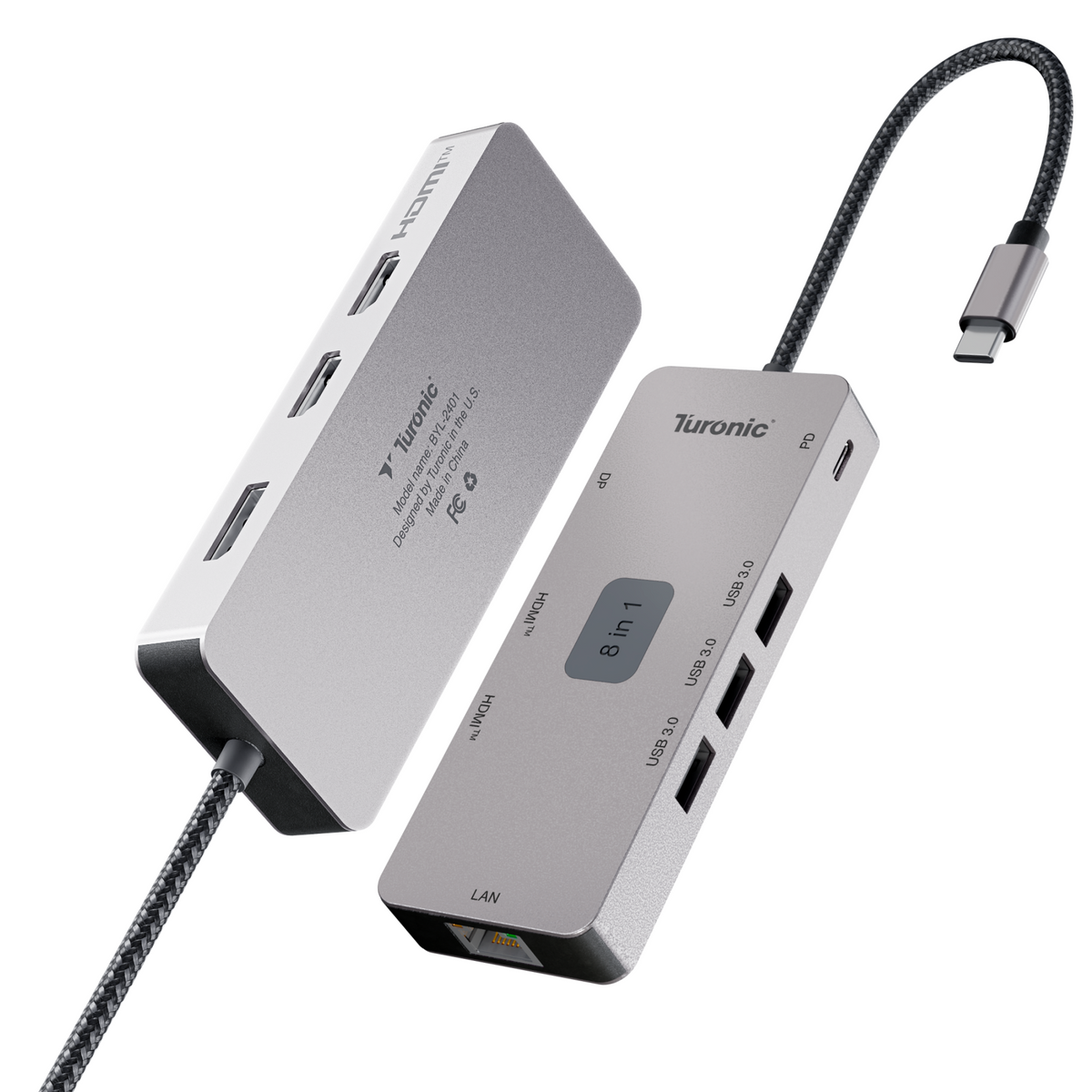
Most modern laptops and compact PCs ship with one or two USB-C ports and nothing else, which forces you to choose between charging, an external monitor, and your peripherals. A USB-C hub solves this by turning a single port into a full set of connections for displays, drives, Ethernet, and input devices. For this guide, we evaluated each hub on total port count and mix, video output capabilities (resolution and refresh rate over HDMI or DisplayPort), power delivery passthrough, USB data speeds, Ethernet support, build quality, cable length, and price. Our top pick is the Turonic DockHub Mini 8-in-1 (BYL-2401), which packs triple 4K@60Hz display output, Gigabit Ethernet, and 100W passthrough charging into a 104-gram aluminum body.
Best
Turonic DockHub Mini 8-in-1 (BYL-2401)
Best Overall USB-C Hub for PC
Three Extended 4K Monitors from One USB-C Port
The BYL-2401 packs two HDMI ports and a DisplayPort 1.2 into a pocket-sized mini dock, each driving 4K at 60Hz. Windows handles MST natively, so a single USB-C port turns into three independent extended displays — a capability that normally costs $250+ in dock form. Three USB-A 3.0 ports at 5 Gbps and Gigabit Ethernet cover peripherals and wired networking at the same time.
Full Desk Setup That Fits in a Laptop Sleeve
At 104 grams with a 143 mm integrated cable, the slim aluminum body travels as easily as it docks. The 100W passthrough keeps the laptop charging while every port stays active, and compatibility spans Windows, Mac, Android, and iPhone. At $79.97 with a 1-year warranty and 30-day returns, it delivers the highest screen-per-dollar ratio in the roundup.
What Makes a USB-C Hub Right for a PC?

A USB-C hub is a compact, bus-powered adapter that splits one USB-C port on your computer into multiple downstream connections: video outputs, USB-A and USB-C data ports, Ethernet, card readers, and passthrough charging. Unlike a Thunderbolt docking station, a hub draws power from the laptop itself (or from a charger plugged into its PD port), needs no external power brick, and typically costs between $30 and $150 rather than $250 to $400.
For a hub to deliver its full feature set, the host port on your PC must support three things at once: data, video output (DisplayPort Alt Mode), and power. Any port labeled USB 3.0, USB 3.2, USB4, Thunderbolt 3, or Thunderbolt 4 qualifies. Ports that carry data only, common on budget Windows laptops and desktop front panels, will run the hub's USB and Ethernet connections but leave the HDMI and DisplayPort outputs dead. Check your PC's spec sheet for a DisplayPort or lightning-bolt icon next to the USB-C port before buying a display-capable hub.
Port compatibility breaks down into three tiers. Full-featured USB-C ports (video + data + power) work with every hub in this list. Thunderbolt 3/4 ports enable the highest tier of performance, including 40 Gbps docks like the CalDigit TS4. Data-only USB-C ports limit you to USB expansion and networking; if that describes your machine, prioritize hubs with strong USB and Ethernet arrays over display output.
One more distinction matters specifically for PC users. Windows machines natively support dual extended displays over a single USB-C port via MST (Multi-Stream Transport), while macOS does not. Hubs with two HDMI outputs, including our top pick, run two independent extended screens on Windows without extra software. On a Mac, the same hardware mirrors the second display unless the hub uses DisplayLink or similar driver-based technology, as the Belkin Connect Universal does.
Comparison Table: Top 10 USB-C Hubs for PC

|
Model |
Total Ports |
Video Output (max) |
Max PD to Host |
USB Data Ports (A / C) |
Ethernet |
Price |
|
Turonic DockHub Mini 8-in-1 (BYL-2401) |
8 |
2× HDMI + 1× DP 1.2, all 4K@60Hz |
100W in |
3 / 0 |
1 Gbps |
$79.97 |
|
Anker 555 8-in-1 |
8 |
HDMI 2.0, 4K@60Hz |
85W |
2 / 1 |
1 Gbps |
~$50 |
|
UGREEN Revodok Pro 109 |
8 |
HDMI 2.0, 4K@60Hz |
90W |
3 / 1 |
1 Gbps |
~$60 |
|
CalDigit TS4 Thunderbolt 4 Dock |
18 |
TB4 + DP 1.4, dual 4K@60Hz+ |
98W |
5 / 3 |
2.5 Gbps |
~$290 |
|
Plugable USBC-10IN1E |
10 |
HDMI + DP, 4K@60Hz |
87W |
3 / 1 |
1 Gbps |
~$70 |
|
Satechi USB-C Multiport Adapter V3 |
9 |
HDMI, 4K@60Hz |
75W |
3 / 1 |
1 Gbps |
~$90 |
|
Hiearcool 7-in-1 |
7 |
HDMI, 4K@30Hz |
87W |
2 / 0 |
No |
~$20 |
|
OWC USB-C Travel Dock |
6 |
HDMI 2.0, 4K@60Hz |
100W |
2 / 0 |
1 Gbps (E model) |
~$55 |
|
Dockcase Smart 10-in-1 Explorer Edition |
10 |
HDMI + DP, 4K@60Hz |
87W |
3 / 1 |
1 Gbps |
~$90 |
|
Belkin Connect Universal 8-in-1 Dual Display |
8 |
2× HDMI (2.0 + 1.4), 4K@60Hz |
85W |
2 / 2 |
1 Gbps |
~$140 |
Legend: PD to Host shows the actual wattage delivered to the laptop via passthrough charging (the input rating is higher because the hub consumes some power). USB Data Ports counts downstream ports usable for peripherals; power-only USB-C connectors are excluded. 4K@60Hz means the port drives a 4K monitor at a 60Hz refresh rate; 4K@30Hz ports show visible lag with mouse movement.
Top 10 USB-C Hubs for PC - Detailed Reviews
Each hub below underwent the same evaluation: verified port specifications, video output limits, actual power delivery to the host, and pricing at the time of writing. Reviews are ordered by overall score for PC use.
Turonic DockHub Mini 8-in-1 (BYL-2401) — Best Overall USB-C Hub for PC

Rating: ⭐⭐⭐⭐⭐
The BYL-2401 packs triple display output into a pocket-sized mini dock: two HDMI ports and a DisplayPort 1.2 port, each driving 4K at 60Hz. Add three USB-A 3.0 ports, Gigabit Ethernet, and 100W passthrough charging, and a single USB-C port on your PC turns into a full desk setup. The slim aluminum body weighs 104 grams and fits any laptop sleeve.
Detailed Specifications:
- Total Ports: 8-in-1
- Connection Interface: USB-C (USB 3.2)
- Video Output: 2× HDMI + 1× DisplayPort 1.2
- Max Resolution/Refresh: 4K@60Hz on all three outputs; 1080p@120Hz
- USB-A Ports: 3× USB 3.0, 5 Gbps
- USB-C Data Ports: N/A
- PD to Host: up to 100W passthrough
- Ethernet: 1 Gbps
- Card Reader: N/A
- Cable Length: 143 mm integrated
- Weight: 104 g
- Price: $79.97 (MSRP $89.99)
+ Pros:
- Triple 4K@60Hz display output
- Sub-$80 price
- 100W passthrough charging
- Gigabit Ethernet built in
- 104 g, sleeve-friendly body
- Three full-speed USB-A ports
- Works with Windows, Mac, Android, iPhone
- Cons:
- No card reader
- No downstream USB-C data port
- USB-A capped at 5 Gbps
Why it's our choice for PC:
Windows handles MST natively, so the BYL-2401 drives three independent extended 4K@60Hz monitors from a single port, a capability that normally costs $250+ in dock form. For traders, developers, and editors on a PC, this is the highest screen-per-dollar ratio in the roundup.
Anker 555 8-in-1 USB-C Hub

Rating: ⭐⭐⭐⭐☆
Anker's 555 covers the standard productivity loadout: one 4K@60Hz HDMI, Gigabit Ethernet, SD and microSD readers, plus three 10 Gbps data ports. At 0.6 inches thick and 125 grams, it travels well, and the 100W PD input feeds up to 85W back to the laptop. Engadget rated it a close runner-up to the UGREEN Revodok Pro 109 in 2026 testing.
Detailed Specifications:
- Total Ports: 8-in-1
- Connection Interface: USB-C 3.2 Gen 2
- Video Output: 1× HDMI
- Max Resolution/Refresh: 4K@60Hz
- USB-A Ports: 2× USB 3.2 Gen 2, 10 Gbps
- USB-C Data Ports: 1× USB 3.2 Gen 2, 10 Gbps
- PD to Host: 85W (100W input)
- Ethernet: 1 Gbps
- Card Reader: SD + microSD, UHS-I
- Cable Length: 19 cm (7.5 in) integrated
- Weight: 125 g
- Price: ~$50
+ Pros:
- All data ports 10 Gbps
- 4K@60Hz HDMI
- SD + microSD slots
- Ethernet included
- Thoughtful port layout
- Strong price-to-feature ratio
- Cons:
- Single display output only
- One downstream USB-C
- UHS-I card speeds only
- No rubber feet
Why it's our choice for PC:
The 555 suits PC users who move files constantly: every USB port runs at 10 Gbps, double the speed of most hubs in this price bracket. One cable connects monitor, wired network, and camera cards to any Windows laptop.
UGREEN Revodok Pro 109 USB-C Hub

Rating: ⭐⭐⭐⭐☆
Engadget's pick for best overall USB-C hub of 2026, the Revodok Pro 109 offers eight usable downstream connections with a premium build. The 4K@60Hz HDMI, three USB-A ports (one at 10 Gbps), a 10 Gbps USB-C, Gigabit Ethernet, and friction-fit SD slots that skip the unreliable spring eject mechanism make it a well-rounded desk companion.
Detailed Specifications:
- Total Ports: 9-in-1 (8 downstream + PD input)
- Connection Interface: USB-C 3.2
- Video Output: 1× HDMI 2.0
- Max Resolution/Refresh: 4K@60Hz (requires DP 1.4 host)
- USB-A Ports: 1× 10 Gbps + 2× 5 Gbps
- USB-C Data Ports: 1× USB 3.2 Gen 2, 10 Gbps
- PD to Host: 90W (100W input)
- Ethernet: 1 Gbps
- Card Reader: SD + microSD
- Cable Length: 25 cm (10 in) integrated
- Weight: ~100 g
- Price: $64.99 (frequent sales to ~$55)
+ Pros:
- Premium build quality
- 4K@60Hz HDMI with HDR
- Generous 10-inch cable
- Three USB-A ports
- Spring-free SD slot design
- 90W to host, class-leading
- Cons:
- One usable downstream USB-C
- 4K@60Hz needs DP 1.4 host
- Second USB-C is power-only
- No DisplayPort option
Why it's our choice for PC:
For a single-monitor PC workstation, the 109 delivers the most refined everyday experience: fast wired networking, quick card imports, and 90W of charging through one cable, with build quality reviewers consistently rank above same-priced rivals.
CalDigit TS4 Thunderbolt 4 Dock

Rating: ⭐⭐⭐⭐☆
The TS4 sits in a different weight class: 18 ports, a 230W external power supply, and full 40 Gbps Thunderbolt 4 bandwidth. PCs with a Thunderbolt 4 or USB4 port get dual 4K@60Hz displays, 2.5 Gigabit Ethernet, UHS-II card readers, and a constant 98W of host charging that never drops when peripherals connect. It ranks second here only because most readers searching for a hub want bus-powered portability.
Detailed Specifications:
- Total Ports: 18
- Connection Interface: Thunderbolt 4 (40 Gbps)
- Video Output: 2× TB4 downstream + 1× DisplayPort 1.4
- Max Resolution/Refresh: dual 4K@60Hz (Windows/Intel), single 8K
- USB-A Ports: 5× 10 Gbps
- USB-C Data Ports: 3× 10 Gbps (one with 20W charging)
- PD to Host: 98W, dedicated
- Ethernet: 2.5 Gbps
- Card Reader: SD + microSD, UHS-II
- Cable Length: 0.8 m detachable, certified
- Weight: 640 g
- Price: ~$300 street (verify current retail)
+ Pros:
- 18 ports, category maximum
- Full 40 Gbps bandwidth
- Constant 98W host charging
- 2.5GbE networking
- UHS-II dual card readers
- Offline device charging
- Vertical or horizontal placement
- Cons:
- Requires wall power
- ~$300 price
- Needs TB4/USB4 host for full speed
- Two-year warranty only
Why it's our choice for PC:
Desktop-bound PC users with Thunderbolt 4 laptops get a permanent command center: every peripheral, two monitors, and fast wired networking connect via a single cable that also charges a 16-inch workstation at full speed.
Plugable USBC-10IN1E

Rating: ⭐⭐⭐⭐☆
Launched in April 2026 and named a Macworld Editors' Choice, this 10-in-1 brings three specs rarely found together in a bus-powered hub: 140W EPR power input with 125W to the host, native HDMI 2.1 driving 8K@30Hz or 4K@144Hz, and 2.5 Gbps Ethernet. The driverless design works across Windows, macOS, and ChromeOS, which simplifies mixed-fleet IT deployments.
Detailed Specifications:
- Total Ports: 10-in-1
- Connection Interface: USB-C 3.2 Gen 2
- Video Output: 1× HDMI 2.1
- Max Resolution/Refresh: 8K@30Hz or 4K@144Hz
- USB-A Ports: 1× 10 Gbps + 2× 5 Gbps
- USB-C Data Ports: 2× 10 Gbps
- PD to Host: 125W (140W EPR input)
- Ethernet: 2.5 Gbps
- Card Reader: SD + microSD
- Cable Length: integrated USB-C
- Weight: ~120 g
- Price: $74.95
+ Pros:
- 125W to host, class record
- 4K@144Hz for gaming monitors
- 2.5GbE networking
- Two 10 Gbps USB-C ports
- Driverless, cross-platform
- $75 price undercuts docks
- Cons:
- Single display output
- No 3.5mm audio jack
- Two USB-A ports limited to 5 Gbps
- 8K capped at 30Hz
Why it's our choice for PC:
Gamers and creators with high-refresh monitors get 4K@144Hz from a portable hub, and owners of power-hungry PC workstations finally get full-speed charging: 125W covers machines that drain through standard 100W hubs under load.
Satechi USB-C Multiport Adapter V3

Rating: ⭐⭐⭐⭐☆
Satechi built the V3 around an all-USB-C philosophy: four Type-C data ports (three at 10 Gbps), zero Type-A. The HDMI 2.1 output reaches 8K@30Hz or 4K@120/144Hz on Windows hosts, and the UHS-II SD reader hits 312 MB/s. The aluminum enclosure with a braided cable matches the aesthetics of premium laptops, though legacy USB-A peripherals will require adapters.
Detailed Specifications:
- Total Ports: 9-in-1
- Connection Interface: USB-C 3.2 Gen 2
- Video Output: 1× HDMI 2.1
- Max Resolution/Refresh: 8K@30Hz, 4K@120/144Hz (Windows)
- USB-A Ports: N/A
- USB-C Data Ports: 3× 10 Gbps + 1× 5 Gbps
- PD to Host: 85W (100W input)
- Ethernet: 1 Gbps
- Card Reader: SD, UHS-II (312 MB/s)
- Cable Length: 17 cm (6.7 in) braided
- Weight: 120 g
- Price: $99.99
+ Pros:
- Four USB-C data ports
- 4K@120/144Hz on Windows
- UHS-II SD reader
- Aluminum build, braided cable
- Three color options
- Plug-and-play, no drivers
- Cons:
- Zero USB-A ports
- No microSD slot
- USB-C ports lack video out
- $100 price
Why it's our choice for PC:
Modern PC setups with USB-C keyboards, webcams, and SSDs run out of Type-C ports on every other hub in this list. The V3 solves that specific bottleneck with four of them, plus high-refresh 4K that Windows hosts exploit fully.
Hiearcool 7-in-1 USB-C Hub

Rating: ⭐⭐⭐⭐☆
One of Amazon's best-selling hubs, the Hiearcool 7-in-1 covers the basics at roughly a fifth of the price of premium rivals: HDMI output, two 5 Gbps USB-A ports, SD and microSD readers, and 100W passthrough charging in a 51-gram anodized aluminum shell. The HDMI tops out at 4K@30Hz, which suits presentations and document work rather than fluid desktop use.
Detailed Specifications:
- Total Ports: 7-in-1
- Connection Interface: USB-C (DP Alt Mode required)
- Video Output: 1× HDMI
- Max Resolution/Refresh: 4K@30Hz (1080p@60Hz)
- USB-A Ports: 2× USB 3.0, 5 Gbps
- USB-C Data Ports: N/A
- PD to Host: up to 100W passthrough (minus hub draw)
- Ethernet: No
- Card Reader: SD + microSD
- Cable Length: integrated, short
- Weight: 51 g
- Price: ~$20
+ Pros:
- ~$20 price
- 51 g, lightest here
- UL/SGS certified
- SD + microSD slots
- Eight color options
- 100W PD passthrough
- Cons:
- 4K limited to 30Hz
- No Ethernet
- No USB-C data port
- USB-A at 0.9A max
Why it's our choice for PC:
Students and travelers who need occasional HDMI output for a projector plus card imports get all of it for the cost of a lunch. As a backup hub for a PC laptop bag, nothing here matches the weight or the price.
OWC USB-C Travel Dock E

Rating: ⭐⭐⭐⭐☆
OWC shaped the Travel Dock E like a hockey puck with a hidden trick: the integrated cable wraps into a storage groove underneath, so it never dangles in a bag. Six ports cover the travel essentials, including 4K@60Hz HDMI 2.0, Gigabit Ethernet, a UHS-II SD reader at 312 MB/s, and up to 100W passthrough power. OWC backs it with a 2-year warranty and its Dock Ejector utility for safe multi-drive disconnects.
Detailed Specifications:
- Total Ports: 6-in-1
- Connection Interface: USB-C 3.2 Gen 1
- Video Output: 1× HDMI 2.0
- Max Resolution/Refresh: 4K@60Hz (up to 4096×2160)
- USB-A Ports: 2× USB 3.2 Gen 1, 5 Gbps
- USB-C Data Ports: N/A
- PD to Host: up to 100W passthrough (15W hub draw)
- Ethernet: 1 Gbps
- Card Reader: SD 4.0, UHS-II (312 MB/s)
- Cable Length: 15 cm (5.9 in), stows underneath
- Weight: ~113 g
- Price: $64.99 MSRP
+ Pros:
- Cable stows in body
- UHS-II SD reader
- 4K@60Hz HDMI 2.0
- Gigabit Ethernet
- Dock Ejector software
- 2-year warranty
- Cons:
- Six ports only
- No microSD slot
- No USB-C data port
- USB-A at 5 Gbps
Why it's our choice for PC:
Photographers and field workers on PC laptops benefit most: the 312 MB/s UHS-II reader imports a full card several times faster than the UHS-I readers on competing hubs, and the self-stowing cable survives bag life without connector damage.
Dockcase Smart USB-C Hub 10-in-1 Explorer Edition

Rating: ⭐⭐⭐⭐☆
No other hub shows you what it's doing. The Explorer Edition pairs a see-through casing with a built-in smart display that reports power draw per port, connection status, and transfer activity in real time, controlled by a single D-Key button. Underneath the novelty sits serious hardware: HDMI 2.1a plus DisplayPort 1.4a (each up to 8K@30Hz, dual 4K@60Hz), 10 Gbps data ports, UHS-II card slots, and Gigabit Ethernet.
Detailed Specifications:
- Total Ports: 10-in-1
- Connection Interface: USB-C 3.2 Gen 2
- Video Output: 1× HDMI 2.1a + 1× DisplayPort 1.4a
- Max Resolution/Refresh: 8K@30Hz single, dual 4K@60Hz
- USB-A Ports: 1× 10 Gbps + 2× USB 2.0
- USB-C Data Ports: 1× 10 Gbps
- PD to Host: 100W input (minus hub draw)
- Ethernet: 1 Gbps
- Card Reader: SD + microSD, UHS-II (312 MB/s)
- Cable Length: integrated USB-C
- Weight: ~130 g
- Price: varies by retailer (listed up to $180.99; check current)
+ Pros:
- Live status display
- Dual extended 4K@60Hz
- HDMI + DisplayPort combo
- UHS-II card readers
- 24V surge protection
- Steam Deck and Switch support
- Cons:
- Two USB-A stuck at USB 2.0
- Bandwidth shared across everything
- Higher price than rivals
- Display adds bulk
Why it's our choice for PC:
PC users running dual extended monitors over MST get both outputs at 4K@60Hz, and the onboard display removes guesswork when diagnosing why a drive dropped, or a port underdelivers power, a debugging tool no other hub offers.
Belkin Connect Universal USB-C 8-in-1 Dual Display Core Hub

Rating: ⭐⭐⭐⭐☆
Belkin built this hub around one specific problem: dual extended displays on machines that block MST, including MacBooks. Silicon Motion technology drives the second HDMI through a software layer, delivering one screen at 4K@60Hz and another at 4K@30Hz on almost any host. PC users get the same dual-HDMI array natively, plus two 10 Gbps USB-C data ports, a rarity in this class. The housing uses a minimum of 60% recycled plastic.
Detailed Specifications:
- Total Ports: 8-in-1
- Connection Interface: USB-C 3.2 Gen 2
- Video Output: 2× HDMI (2.0 + 1.4)
- Max Resolution/Refresh: 4K@60Hz + 4K@30Hz
- USB-A Ports: 2× USB 3.2 Gen 1, 5 Gbps
- USB-C Data Ports: 2× 10 Gbps
- PD to Host: 85W (100W input, 15W hub draw)
- Ethernet: 1 Gbps
- Card Reader: N/A
- Cable Length: 23 cm (9 in) integrated
- Weight: ~150 g
- Price: $139.99 (frequently $119.99)
+ Pros:
- Dual extended displays anywhere
- Two 10 Gbps USB-C ports
- Works across Win/Mac/Chrome
- Gigabit Ethernet
- 60% recycled housing
- Free dock utility software
- Cons:
- Second display capped 30Hz
- Runs hot under load
- No card readers
- Premium price
Why it's our choice for PC:
Hybrid workers who switch between a Windows PC and a Mac keep the same dual-monitor setup with a single hub: Windows drives both screens natively, and the Silicon Motion driver covers the Mac side without hardware changes.
How to Choose a USB-C Hub for PC

Start with the port mix, because it eliminates most options before any other spec matters. Count what you actually plug in during a normal week: monitors, wired keyboard or mouse, external drives, camera cards, Ethernet. Then match that list against the downstream ports of each candidate, treating power-only USB-C connectors as charging inputs rather than usable ports. A "9-in-1" label often hides one power-only port and a host cable in the count.
Match Video Output to Your Monitor
Check three numbers before buying: your monitor's resolution, its refresh rate, and the HDMI or DisplayPort version the hub carries. HDMI 1.4 caps 4K at 30Hz, which makes cursor movement feel delayed on a desktop. HDMI 2.0 handles 4K@60Hz, the practical minimum for daily work, while HDMI 2.1 units like the Plugable USBC-10IN1E reach 4K@144Hz for high-refresh gaming panels. For multi-monitor plans on Windows, confirm the hub outputs independent extended displays over MST rather than mirroring.
Verify Host Port Capability
The hub inherits the limits of the port it plugs into. A USB-C port without DisplayPort Alt Mode leaves every video output dead regardless of what the hub promises, and a Thunderbolt dock like the CalDigit TS4 delivers full performance only on a TB4 or USB4 host. Find the DisplayPort or lightning-bolt icon next to your PC's USB-C port, or check the spec sheet, before spending money on display features your machine cannot feed.
Power Delivery That Covers Your Laptop
Subtract roughly 15W from the hub's advertised PD input to get the wattage your laptop actually receives. A 100W-input hub delivers 85 to 90W, enough for most ultrabooks and mid-size machines. Gaming laptops and 16-inch workstations that ship with 130W+ chargers will drain slowly under load through a standard hub; for those, the 140W EPR input on the Plugable (125W to host) or direct wall charging solves the gap.
Data Speed: 5 vs 10 Gbps
The difference shows up with external SSDs: a 10 Gbps port moves a 20GB file in under 20 seconds, while a 5 Gbps port takes twice as long. Keyboards, mice, and webcams never saturate 5 Gbps, so pay for 10 Gbps ports only where drives or capture devices will live. Remember that all downstream ports share the single host connection, so simultaneous heavy transfers split the available bandwidth.
Build, Heat, and Cable Length
Aluminum housings dissipate heat better than plastic, and heat matters: hubs pushing display, Ethernet, and charging at once run warm, with the Belkin Connect Universal noted by reviewers as the hottest in its class. Cable length decides desk ergonomics; the 10-inch lead on the UGREEN 109 tucks behind a laptop, while sub-6-inch cables force the hub to sit beside the port. For travel, favor stowed-cable designs like the OWC Travel Dock E over dangling connectors that wear out in bags.
Budget breaks into three tiers. Under $30 buys basic expansion with 4K@30Hz video (Hiearcool) for presentations and card imports. The $50 to $100 range covers full-featured daily drivers with 4K@60Hz, Ethernet, and 85 to 125W charging, where the Turonic BYL-2401, Anker 555, UGREEN 109, and Plugable live. Above $130, you move into driver-assisted dual display (Belkin) and full Thunderbolt docking (CalDigit) for permanent desk setups.
FAQ
What is the best USB-C hub for PC overall?
The Turonic DockHub Mini 8-in-1 (BYL-2401) takes the top spot at $79.97. It drives three extended 4K@60Hz monitors on Windows through dual HDMI plus DisplayPort 1.2, adds Gigabit Ethernet, three USB-A ports, and 100W passthrough charging in a 104-gram aluminum body.
Do USB-C hubs work with desktop PCs or only laptops?
They work with both, provided the USB-C port supports the needed features. Desktop front-panel USB-C ports often carry only data, disabling the hub's video outputs while USB and Ethernet remain active. Rear ports wired to the graphics card or a Thunderbolt controller support the full feature set.
Can a USB-C hub run two monitors on a PC?
Yes, on Windows machines with MST support, which covers most modern PCs. Hubs with dual video outputs, such as the Turonic BYL-2401 or Dockcase Explorer Edition, run two independent extended displays at 4K@60Hz. MacBooks need driver-based hubs, such as the Belkin Connect Universal, to achieve the same result.
Why is my USB-C hub not showing video output?
The host port typically lacks DisplayPort Alt Mode. Video requires a USB-C port rated for USB 3.0 or higher with DP Alt Mode; data-only ports power the hub's USB and Ethernet functions, while HDMI remains black. Also confirm the monitor cable matches the hub's HDMI version for the target resolution.
How much power does a USB-C hub pass to the laptop?
Expect the advertised input minus roughly 15W of hub consumption. A 100W-input hub delivers 85 to 90W to the host, which charges most laptops at full speed. Machines shipping with chargers above 100W need an EPR-class hub such as the Plugable USBC-10IN1E (125W to host) or separate wall charging.
Will a USB-C hub slow down my PC's data transfer?
A hub adds no meaningful slowdown for a single device: a 10 Gbps port through a hub matches a direct connection within a few percent. Slowdowns occur when several bandwidth-heavy devices share a single host link simultaneously, because a 4K display stream plus two SSD transfers must split the available throughput.
Final Thoughts on Choosing a USB-C Hub for PC
For most PC users, the Turonic DockHub Mini 8-in-1 (BYL-2401) is the strongest buy in 2026. It delivers triple 4K@60Hz display output that no rival offers under $150, pairs it with Gigabit Ethernet and 100W passthrough charging, and keeps the whole package at 104 grams and $79.97, backed by a 1-year warranty and 30-day returns.
Specific needs point elsewhere: the CalDigit TS4 anchors permanent Thunderbolt 4 desk setups with 18 ports and 98W charging, the Plugable USBC-10IN1E serves high-refresh gaming monitors and 125W laptops, the Satechi V3 fits all-USB-C peripheral fleets, and the Hiearcool 7-in-1 handles occasional travel duty for around $20. Decide by matching three things: your host port's capabilities, the displays you run, and the wattage your laptop needs, then pick the cheapest hub that meets all three.
Related reading
- Best USB-C Hub for Mac Mini
- Best USB-C Hub with Ethernet - Top 10 Picks That Deliver Full Gigabit Speeds
- What Is a USB-C Adapter?
- USB Hub for Laptop: Which Turonic Option Fits Your Setup
- 4-Port USB Hub: What to Look for and How Turonic's USB-C Hubs Compare
- Powered USB Hub: What to Look For and How the Turonic USB-C Hubs Deliver


