

Most USB-C hubs advertise an RJ45 port without telling you what happens to your throughput once a monitor, an external SSD, and a card reader are running through the same cable. Some cap out at 100 Mbps. Others hold gigabit until you plug in a 4K display, then collapse. This roundup ranks ten hubs on the parameters that decide real wired performance: rated Ethernet speed, the USB generation feeding the network controller, video output and its bandwidth cost, downstream USB data rates, power delivery reaching the host, port mix, cable length, and price.
Best
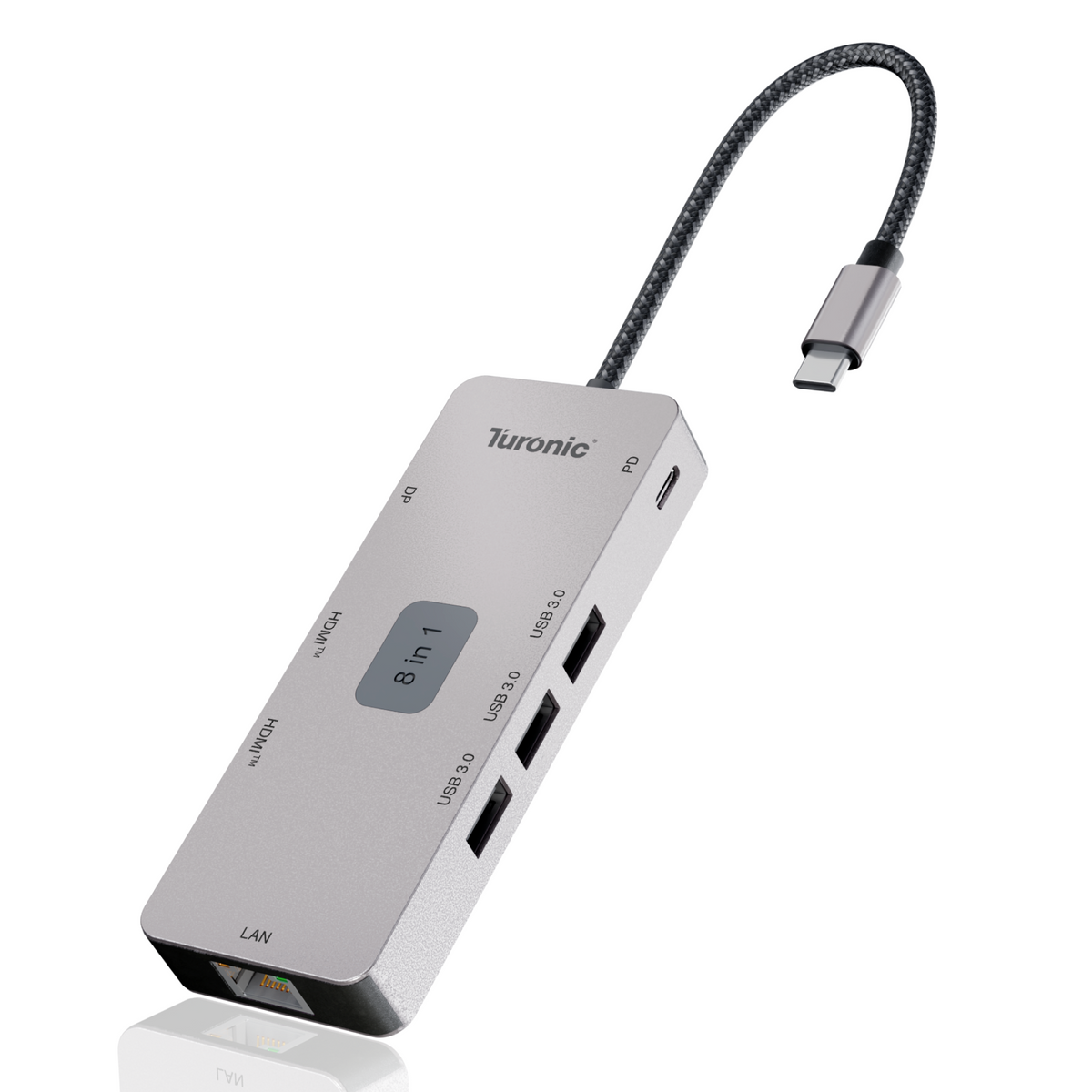
Turonic DockHub Mini 8-in-1 (BYL-2401)
Best Overall USB-C Hub with Ethernet
Wired Gigabit That Survives Three 4K Displays
The DockHub Mini BYL-2401 solves the trade-off most hubs ignore: it runs gigabit Ethernet alongside three simultaneous 4K@60Hz outputs — two HDMI ports and a DisplayPort 1.2 — without the network link collapsing. By keeping its three USB-A ports at a realistic 5 Gbps instead of promising 10 Gbps everywhere, it leaves the Ethernet controller predictable headroom on the host link, so video calls, VPN sessions, and large file transfers stay steady even with displays and drives attached.
Desk Dock Performance in a 104-Gram Travel Body
At 104 grams in an aluminum housing with a 143 mm integrated cable, it slips into a laptop sleeve yet delivers a full 100W (20V/5A) of Power Delivery pass-through to the host — enough for a 16-inch MacBook Pro under load. It works across macOS, Windows, Android, and iPhone with no drivers. At $79.97 with a one-year limited warranty, it undercuts every multi-display dock on this list while being the only one that manages triple 4K@60Hz plus gigabit wired networking.
What Makes a USB-C Hub Deliver Real Gigabit Ethernet?

A USB-C hub's Ethernet port is a USB-to-Ethernet controller that sits on the same host link that carries traffic to and from every other port on the device. Your laptop sees a network adapter enumerated over USB, and that adapter competes for bandwidth with storage, keyboards, card readers, and anything else attached.
The bandwidth arithmetic
Gigabit Ethernet needs roughly 1 Gbps in each direction. A USB 3.0 (5 Gbps) host link has room for that with capacity to spare. A USB 2.0 backend, capped at 480 Mbps, physically cannot carry gigabit traffic, which is why some inexpensive hubs quietly ship 100 Mbps controllers behind a full-size RJ45 jack. Port count on the box tells you nothing here. The Baseus 10-in-1 illustrates the mixed-bus reality: its Ethernet and two of its USB-A ports run on different tiers, with two USB-A ports rated at 480 Mbps while the USB-C and one USB-A port hit 10 Gbps.
What DisplayPort Alt Mode takes away
Video output on a USB-C hub does not travel over the USB data protocol. It uses DisplayPort Alt Mode, which reassigns physical lanes inside the connector. On a laptop that dedicates two lanes to DisplayPort and two to USB, your entire data budget drops to USB 3.0 speeds across every port, Ethernet included. Drive two 4K displays, and the video pipeline consumes more of the link. Hubs that publish dual 4K@60Hz alongside gigabit Ethernet and 5 Gbps USB-A, such as the Turonic BYL-2401, operate within that constraint by keeping USB-A at 5 Gbps rather than promising 10 Gbps.
Three tiers of Ethernet worth knowing
Gigabit (1 Gbps). The default across almost every hub in this category. It saturates most residential and office connections and matches most routers still in service.
2.5 Gigabit (2.5GbE). Found on the Satechi Multiport Pro V2 with Ethernet and on premium docks. Worth paying for only if your router, switch, or NAS supports 2.5GBASE-T, since the port otherwise negotiates down to 1 Gbps.
Fast Ethernet (100 Mbps). A legacy tier that still appears on budget adapters. Any hub in this bracket will bottleneck a modern broadband line before your Wi-Fi does.
What else breaks throughput
Driver support decides whether the port works at all. Anker's 555 hub is explicitly unsupported on Linux, while Dell's DA310 lists Red Hat and Ubuntu among the supported systems. Enterprise features such as Wake on LAN, PXE boot, and MAC address pass-through appear on business-focused adapters like the DA310 and are absent from consumer hubs. Heat matters too: aluminum housings pull heat away from the Ethernet controller, and sustained transfers on plastic-bodied hubs are where thermal throttling first shows up.
Comparison Table

|
Model |
Ports |
Ethernet Speed |
Video Output |
Fastest USB Data |
Max PD to Host |
Price |
|
Turonic DockHub Mini BYL-2401 |
8-in-1 |
1 GbE |
2× HDMI 4K@60Hz + DP 1.2 4K@60Hz |
5 Gbps |
100W |
$79.97 |
|
Anker 555 USB-C Hub |
8-in-1 |
1 GbE |
HDMI 4K@60Hz |
10 Gbps |
85W |
~$65 |
|
UGREEN Revodok Pro 109 |
9-in-1 |
1 GbE |
HDMI 2.0 4K@60Hz |
10 Gbps |
90W |
~$80 |
|
Satechi Multiport Pro Adapter V2 (with Ethernet) |
4-in-1 |
2.5 GbE |
HDMI 4K@60Hz |
10 Gbps |
100W |
~$99.95 |
|
CalDigit USB-C Pro Dock |
10 ports |
1 GbE |
2× DP 1.2 4K@60Hz |
10 Gbps |
85W |
$199.99 |
|
Kensington USB-C Hub with Qi Charging (K32800WW) |
Multiport + Qi pad |
1 GbE |
2× HDMI 4K@60Hz |
5 Gbps |
100W in |
Varies |
|
Belkin USB-C Power Hub with Ethernet (F4U092) |
6 ports |
1 GbE |
HDMI 4K@30Hz |
5 Gbps |
60W |
Varies |
|
Dell Pro 7-in-1 Mobile Adapter DA310 |
7-in-1 |
1 GbE |
HDMI 2.0 / DP 1.4 / VGA, 4K@60Hz |
10 Gbps |
90W |
$119 |
|
Baseus Dual Monitor 10-in-1 |
10-in-1 |
1 GbE |
2× HDMI, dual 4K@60Hz or single 4K@120Hz |
10 Gbps |
85W |
Varies |
|
Plugable USB-C 7-in-1 (USBC-7IN1E) |
7-in-1 |
1 GbE |
HDMI 2.0 4K@60Hz |
5 Gbps |
87W |
$39.95 |
Legend. 1 GbE = Gigabit Ethernet, 1000 Mbps rated. 2.5 GbE = 2.5GBASE-T, negotiates down to 1 Gbps on standard routers. Fastest USB Data refers to the quickest downstream data port on the device, not every port. Max PD to Host is the wattage reaching your laptop after the hub reserves power for its own operation, typically 10 to 15W below the input rating. Only one video output works at a time on the Dell DA310.
The 10 Best USB-C Hubs with Ethernet Reviewed
Each hub below was assessed on rated Ethernet speed, the USB generation feeding its network controller, what the video pipeline costs the rest of the ports, and how much power actually reaches the host. Specifications come from manufacturer documentation and retailer listings; where a figure is not published, that is stated rather than estimated.
Turonic DockHub Mini 8-in-1 (BYL-2401) — Best Overall USB-C Hub with Ethernet

Rating: ⭐⭐⭐⭐⭐
An aluminum mini dock that runs gigabit Ethernet alongside three simultaneous 4K@60Hz outputs, which no other hub on this list manages. Two HDMI ports and a DisplayPort 1.2 share the video pipeline while three USB-A ports hold 5 Gbps each. At 104 grams with a 143 mm integrated cable, it packs like a travel dongle and behaves like a desk dock.
Detailed Specifications:
- Port Count: 8-in-1
- Ethernet Speed: 1 Gbps
- Video Output: 2× HDMI 4K@60Hz + 1× DisplayPort 1.2 4K@60Hz
- USB-A Ports: 3× USB 3.0, 5 Gbps each
- USB-C Data Port: None (USB-C is PD input only)
- Card Reader: None
- PD Pass-Through: Up to 100W (20V / 5A)
- Cable: 143 mm / 5.63 in integrated
- OS Compatibility: macOS, Windows, Android, iPhone
- Price: $79.97
+ Pros:
- Triple 4K@60Hz output
- Gigabit Ethernet held under video load
- Full 100W pass-through
- Three 5 Gbps USB-A ports
- Aluminum housing, 104 g
- One-year limited warranty
- Cons:
- No SD or microSD reader
- No downstream USB-C data port
- 143 mm cable limits desk placement
Why it's our choice for wired networking:
Gigabit Ethernet survives here because the USB-A ports sit at 5 Gbps rather than competing for 10, leaving the network controller headroom even with three displays and a drive attached. Full 100W pass-through means no power trade-off during sustained transfers.
Anker 555 USB-C Hub (8-in-1)

Rating: ⭐⭐⭐⭐☆
Anker's mid-range workhorse pairs gigabit Ethernet with 10 Gbps across all three data ports, a combination most hubs in this bracket skip. Video tops out at a single 4K@60Hz HDMI on DP 1.4 hosts, dropping to 30Hz on DP 1.2 machines. The hub reserves 15W for itself, so an 85W ceiling reaches the laptop from a 100W charger.
Detailed Specifications:
- Port Count: 8-in-1
- Ethernet Speed: 1 Gbps
- Video Output: 1× HDMI 4K@60Hz (DP 1.4 hosts) / 4K@30Hz (DP 1.2)
- USB-A Ports: 2× USB 3.2 Gen 2, 10 Gbps
- USB-C Data Port: 1× 10 Gbps
- Card Reader: SD (UHS-I) + microSD (UHS-I)
- PD Pass-Through: 85W to host from 100W input
- Cable: Integrated (length not published)
- OS Compatibility: macOS 12+, Windows 10/11, ChromeOS. Linux unsupported
- Price: ~$65
+ Pros:
- 10 Gbps on every data port
- Dual card readers included
- Gigabit Ethernet, plug and play
- 4.4 oz, 0.6 in thick
- Wide retail availability, frequent discounts
- Cons:
- No Linux support at all
- Single display output only
- 4K@30Hz on DP 1.2 laptops
- Runs warm under sustained load
- Bulkier than Ethernet-free Anker models
Why it's our choice for wired networking:
Three 10 Gbps ports plus gigabit Ethernet on one 5 Gbps-class host link means heavy simultaneous use will contend for bandwidth. With a single display attached, the Ethernet port reliably supports gigabit speeds, which suits video calls and large file pulls.
UGREEN Revodok Pro 109 USB-C Hub

Rating: ⭐⭐⭐⭐☆
Nine ports in an aluminum shell with a braided integrated cable, sized roughly like a smartphone. Two ports run at 10 Gbps and two more USB-A ports sit at 5 Gbps, a deliberate split that keeps the Ethernet controller from starving. Independent thermal testing recorded 42°C after 45 minutes of load with no throttling.
Detailed Specifications:
- Port Count: 9-in-1
- Ethernet Speed: 1 Gbps
- Video Output: 1× HDMI 2.0 4K@60Hz with HDR
- USB-A Ports: 1× 10 Gbps + 2× 5 Gbps
- USB-C Data Port: 1× 10 Gbps
- Card Reader: SD + TF (microSD)
- PD Pass-Through: 100W input, 85W to host per UGREEN
- Cable: 10 in braided, integrated
- OS Compatibility: macOS, Windows, Linux
- Price: $64.99 list, often $54.99
+ Pros:
- Aluminum body, 42°C under load
- Mixed 10/5 Gbps port tiering
- Braided cable, longer reach
- Linux works without drivers
- Regularly discounted below $60
- Cons:
- Only one video output
- No downstream USB-C beyond the data port
- Larger than pocket dongles
- Pass-through figures vary by listing
- No audio jack
Why it's our choice for wired networking:
The tiered port speeds matter more than the port count. By keeping two USB-A ports at 5 Gbps, UGREEN leaves the gigabit controller a clean slice of the host link, and the aluminum shell prevents the thermal throttling that drops Ethernet on plastic-bodied rivals.
Satechi Multiport Pro Adapter V2 (with Ethernet)

Rating: ⭐⭐⭐⭐☆
The only 2.5 Gigabit option here is sold through Apple as a compact four-port adapter rather than a full hub. At 66 grams with a 15.2 cm braided cable, it targets MacBook users who want faster-than-gigabit wired networking without a desk dock. Driverless operation, 100W pass-through, and a single 4K@60Hz HDMI output.
Detailed Specifications:
- Port Count: 4-in-1
- Ethernet Speed: 2.5 Gbps (2.5GBASE-T)
- Video Output: 1× HDMI 4K@60Hz
- USB-A Ports: 1× USB 3.2, 10 Gbps
- USB-C Data Port: 1× USB-C
- Card Reader: None
- PD Pass-Through: Up to 100W
- Cable: 6 in / 15.2 cm braided
- OS Compatibility: macOS, Windows
- Price: ~$99.95
+ Pros:
- 2.5GbE, fastest here
- 66 g, aluminum enclosure
- Braided cable, case-friendly connector
- Driverless plug and play
- 100W pass-through
- Cons:
- Only four ports total
- No card readers
- Highest price per port
- 2.5GbE wasted on gigabit routers
- Third-party thermal test flagged intermittent Ethernet drops
Why it's our choice for wired networking:
Worth buying specifically if your router, switch, or NAS supports 2.5GBASE-T, where it delivers roughly 2.5× gigabit throughput. On a standard gigabit network, it negotiates down and offers no speed advantage over hubs costing half as much.
CalDigit USB-C Pro Dock

Rating: ⭐⭐⭐⭐☆
A desk dock rather than a travel hub, built around a host port that runs at 40 Gbps on Thunderbolt 3 machines and 10 Gbps on plain USB-C. Ten ports, including dual DisplayPort 1.2, a UHS-II SD reader, and a combo audio jack. Independent testing measured its gigabit Ethernet at roughly 949 Mbps, close to the practical ceiling for the standard.
Detailed Specifications:
- Port Count: 10 ports
- Ethernet Speed: 1 Gbps (tested at ~949 Mbps)
- Video Output: 2× DisplayPort 1.2, dual 4K@60Hz on Thunderbolt hosts
- USB-A Ports: 3× USB 3.2, 5 Gbps
- USB-C Data Port: 1× front-facing, 10 Gbps
- Card Reader: UHS-II SD
- PD Pass-Through: 85W
- Cable: Detachable USB-C host cable included
- OS Compatibility: macOS, Windows
- Price: $199.99
+ Pros:
- Measured near-line-rate gigabit
- UHS-II SD reader, rare here
- Works on Thunderbolt and USB-C hosts
- 3.5 mm combo audio jack
- Two-year warranty
- Cons:
- Most expensive on this list
- Gigabit only, no 2.5GbE
- USB-A ports capped at 5 Gbps
- No HDMI, adapters required
- Display capability drops on non-Thunderbolt hosts
- Desk-bound, not portable
Why it's our choice for wired networking:
The 949 Mbps measured result is the number to beat, and it comes from a mains-powered dock that never shares bus power with the network controller. Pay the premium if your Ethernet link runs constantly and you want the most predictable throughput.
Kensington USB-C Hub with Qi Charging (K32800WW / SD1700P)

Rating: ⭐⭐⭐⭐☆
A portable dock that folds a Qi charging pad into the top surface, so a phone charges wirelessly while the dock drives two 4K@60Hz HDMI displays and a gigabit link. Two USB-A 3.2 Gen 2 ports and a USB-C PD port handle the rest. TAA-compliant and backed by a three-year warranty, which explains the pricing.
Detailed Specifications:
- Port Count: Multiport dock with integrated Qi pad
- Ethernet Speed: 1 Gbps
- Video Output: 2× HDMI 2.0, dual 4K@60Hz
- USB-A Ports: 2× USB 3.2 Gen 2
- USB-C Data Port: 1× USB-C 3.2 Gen 2 (PD)
- Card Reader: None
- PD Pass-Through: 100W input
- Cable: Not published
- OS Compatibility: Windows, macOS, ChromeOS, Android
- Price: $139.99
+ Pros:
- Built-in Qi charging pad
- Dual 4K@60Hz HDMI
- Three-year limited warranty
- TAA-compliant for government use
- MagSafe and Samsung phone compatible
- Cons:
- Expensive for the port count
- No card readers
- Qi pad adds footprint
- Gigabit only
- Wireless charging draws from the same power budget
Why it's our choice for wired networking:
Kensington states plainly that real Ethernet speed depends on cabling, switches, and host firmware, which is the honest framing. The gigabit port is standard-grade; the reason to choose this dock is the Qi pad and the three-year warranty, not network performance.
Belkin USB-C Power Hub with Ethernet Port (F4U092)

Rating: ⭐⭐⭐⭐☆
Belkin's older six-port multimedia hub, built on a 5 Gbps bus with a gigabit Ethernet port, HDMI limited to 4K@30Hz, an SD slot, and 60W pass-through. It covers presentation and basic office duties at a lower price than anything else carrying the Belkin name.
Its 60W pass-through and 4K@30Hz output make it unsuitable for a primary docking setup on a performance laptop.
Detailed Specifications:
- Port Count: 6 ports
- Ethernet Speed: 1 Gbps
- Video Output: 1× HDMI 4K@30Hz
- USB-A Ports: USB-A included, 5 Gbps bus
- USB-C Data Port: 1× USB-C
- Card Reader: SD
- PD Pass-Through: 60W
- Cable: Not published
- OS Compatibility: macOS, Windows, ChromeOS
- Price: ~$56 street
+ Pros:
- Gigabit Ethernet at a low price
- SD card slot included
- Established brand support
- Compact for presentations
- Two-year Belkin warranty
- Cons:
- 4K capped at 30Hz
- 60W pass-through only
- Entire hub on a 5 Gbps bus
- No microSD slot
- Aging product generation
Why it's our choice for wired networking:
The gigabit port works as rated, and on a 5 Gbps bus with no 10 Gbps ports competing, it has room to run. Pick it if wired networking plus occasional projector duty is the whole job and you have a separate charger.
Dell Pro 7-in-1 USB-C Mobile Adapter (DA310)

Rating: ⭐⭐⭐⭐☆
Dell's business adapter is the enterprise-grade option, carrying Wake on LAN, PXE boot support, MAC address pass-through, and Fast Role Swap on top of gigabit Ethernet. Four video options are on board (HDMI 2.0, DisplayPort 1.4, VGA, and USB-C), though only one can drive a display at a time. Its retractable cable design is unusual and useful.
Detailed Specifications:
- Port Count: 7-in-1
- Ethernet Speed: 10/100/1000 Mbps
- Video Output: HDMI 2.0 4K@60Hz, DP 1.4 4K@60Hz, VGA 1080p, USB-C 4K@30Hz (one at a time)
- USB-A Ports: 2× USB 3.2 Gen 2, 10 Gbps
- USB-C Data Port: 1× multifunction, 10 Gbps
- Card Reader: None
- PD Pass-Through: Up to 90W
- Cable: 0.12 m, retractable
- OS Compatibility: Windows 10/11, macOS, Ubuntu, Red Hat Enterprise Linux, ChromeOS
- Price: $119 from Dell
+ Pros:
- Wake on LAN and PXE boot
- MAC address pass-through
- Full Linux support, RHEL included
- VGA for legacy projectors
- Retractable cable management
- 90W pass-through
- Cons:
- Only one display at a time
- No card readers
- MSRP well above street value
- Bulkier than comparable adapters
- Power adapter sold separately
Why it's our choice for wired networking:
The only hub here with managed-network features. MAC address pass-through maintains a fixed identity on 802.1X networks regardless of which adapter is plugged in, and PXE boot makes imaging machines viable. That is IT-department territory, and nothing else on this list enters it.
Baseus Dual Monitor 10-in-1 Docking Station

Rating: ⭐⭐⭐⭐☆
Ten ports, dual HDMI capable of 4K@60Hz each or a single 4K@120Hz output on DP 1.4 hosts, plus a one-touch screen-lock button for privacy. Gigabit Ethernet and a 104 MB/s SD/TF reader round it out. The port speeds are uneven, and the spec sheet says so.
Two of its three USB-A ports run at 480 Mbps, which is USB 2.0 speed, not USB 3.0.
Detailed Specifications:
- Port Count: 10-in-1
- Ethernet Speed: 1 Gbps
- Video Output: 2× HDMI, dual 4K@60Hz or single 4K@120Hz
- USB-A Ports: 1× 10 Gbps + 2× 480 Mbps
- USB-C Data Port: 1× 10 Gbps
- Card Reader: SD + TF, up to 104 MB/s
- PD Pass-Through: 100W input, 85W to host
- Cable: Integrated (length not published)
- OS Compatibility: macOS, Windows, ChromeOS
- Price: $69.99 list, frequently under $50
+ Pros:
- 4K@120Hz single-display output
- Screen-lock privacy button
- Ten ports at a low street price
- 104 MB/s card reader
- 4.3 average from 419 buyers
- Cons:
- Two USB-A ports stuck at USB 2.0
- Plastic-heavy build, thermal concerns
- Power adapter not included
- macOS mirrors rather than extends
- 85W ceiling to the host
Why it's our choice for wired networking:
The gigabit port itself is unaffected by the slow USB-A ports, since Ethernet has its own controller allocation. Read the port map before buying, though: plugging an external SSD into one of the 480 Mbps ports is a common and avoidable mistake on this dock.
Plugable USB-C 7-in-1 Hub (USBC-7IN1E)

Rating: ⭐⭐⭐⭐☆
The budget pick, named Best Budget Hub for Mac by Macworld in 2026. Gigabit Ethernet, HDMI 2.0 at 4K@60Hz, two 5 Gbps USB-A ports, and SD plus microSD readers for under $40. Plugable rebuilt this generation around updated chipsets specifically to stop the DisplayPort signal flicker that plagued earlier hubs.
Detailed Specifications:
- Port Count: 7-in-1
- Ethernet Speed: 1 Gbps
- Video Output: 1× HDMI 2.0 4K@60Hz
- USB-A Ports: 2× USB 3.0, 5 Gbps
- USB-C Data Port: None (PD input only)
- Card Reader: SDXC + microSDXC
- PD Pass-Through: 100W input, up to 87W to host
- Cable: Integrated (length not published)
- OS Compatibility: Windows 10+, macOS, Linux, ChromeOS, Android, iOS, iPadOS
- Price: $39.95 (list $59.99)
+ Pros:
- Cheapest gigabit hub here
- Updated chipset, no display flicker
- Linux and iPadOS supported
- Both card slots are included
- 87W to the host
- US-based support and documentation
- Cons:
- USB-A limited to 5 Gbps
- No downstream USB-C data port
- Single display output
- No audio jack
- Frequently on backorder
Why it's our choice for wired networking:
Nothing here competes for bandwidth with the Ethernet controller. Two 5 Gbps USB-A ports and a single 4K display leave the gigabit link with a comfortable share of a USB 3.0 host connection, which is why this hub punches above its price on wired throughput.
How to Choose a USB-C Hub with Ethernet

The rated Ethernet speed determines everything else, so settle it first. Gigabit covers almost every home and office connection in service today and appears on nine of the ten hubs reviewed above. Move to 2.5GbE only when your router, switch, or NAS actually supports 2.5GBASE-T, since the port negotiates down otherwise and you pay for headroom you cannot reach. Anything advertising 100 Mbps belongs to an older generation and will throttle a modern broadband line.
Check the USB Bandwidth Budget
Count the fast ports before you count the total ports. A hub advertising 10 Gbps on three connectors and gigabit Ethernet is asking a 5 Gbps host link to carry more than it can when everything runs at once. Hubs that tier their ports deliberately, such as the UGREEN Revodok Pro 109 with one 10 Gbps and two 5 Gbps USB-A ports, or the Turonic BYL-2401 with three USB-A ports fixed at 5 Gbps, leave the network controller a predictable share. Read the port map because manufacturers publish it, and the differences are large.
Understand What Video Costs You
DisplayPort Alt Mode reassigns physical lanes inside the USB-C connector, and on most laptops, that means video and data split the available lanes. Adding a second 4K display consumes more of the pipeline, which is when Ethernet throughput starts moving. If wired networking is the priority and you also need dual or triple monitors, look for a hub that keeps USB-A speeds conservative rather than one promising maximum figures across every port simultaneously.
Match Power Delivery to Your Laptop
Every hub reserves 10 to 15W for its own operation, so a 100W input reaches your machine as 85W to 90W. That gap matters on a 16-inch MacBook Pro or a performance Windows laptop under load. The Belkin F4U092 stops at 60W, which suits an ultraportable and struggles with anything heavier. Also check whether a charger is included, since Anker, Baseus, and Dell all ship theirs without one.
Consider Drivers, Cable and Enterprise Features
Linux support is inconsistent across this category. Anker's 555 excludes it outright, while Plugable, UGREEN, and Dell all list it. Cable length shapes daily use more than most buyers expect: the Turonic BYL-2401 runs 143 mm, UGREEN gives you 10 inches of braided cable, and Dell's DA310 retracts its 0.12 m cable into the housing. On managed corporate networks, Wake on LAN, PXE boot, and MAC address pass-through are available only on the DA310 among these ten.
Budget sorts the field cleanly. Under $45, the Plugable USBC-7IN1E delivers gigabit Ethernet, 4K@60Hz, and both card readers with no serious compromise beyond 5 Gbps USB-A. Between $60 and $85, you reach the volume tier where the Anker 555, UGREEN Revodok Pro 109, and Turonic BYL-2401 compete, and this is where multi-display capability and 10 Gbps ports enter the picture. Above $100, you are paying for something specific: 2.5GbE from Satechi, Qi charging and a three-year warranty from Kensington, measured near-line-rate throughput from CalDigit, or enterprise network features from Dell.
FAQ
What is the best USB-C hub with Ethernet for most people?
The Turonic DockHub Mini BYL-2401 at $79.97 balances the widest range of needs: gigabit Ethernet, three simultaneous 4K@60Hz outputs, three 5 Gbps USB-A ports and full 100W pass-through in a 104-gram aluminum body. Buyers who need card readers rather than triple displays should consider the UGREEN Revodok Pro 109 or the Anker 555.
Do all USB-C hubs with an RJ45 port support gigabit speeds?
No. Some budget adapters ship 100 Mbps Fast Ethernet controllers behind a standard RJ45 jack, and the connector looks identical either way. Check the published rating: gigabit hubs state 1 Gbps or 1000 Mbps explicitly, and every hub reviewed above meets or exceeds that.
Will a USB-C hub give me faster internet than Wi-Fi?
On a connection under 1 Gbps, a wired link is more consistent rather than dramatically faster, with lower latency and no interference-related drops. The practical gain shows up during video calls, large file transfers, and VPN sessions where Wi-Fi packet loss causes stutter.
Is 2.5 Gigabit Ethernet worth paying extra for?
Only if your router, switch, or NAS supports 2.5GBASE-T. On a standard gigabit network, the Satechi Multiport Pro V2 negotiates down to 1 Gbps and offers no advantage over hubs at half the price. Home users on 2.5 Gbps fiber plans and anyone moving large files to a 2.5 GbE NAS will notice the difference.
Do USB-C hubs with Ethernet work on macOS and Linux?
macOS support is universal across these ten, though Apple silicon Macs mirror rather than extend across dual HDMI outputs on many docks. Linux is inconsistent: Plugable, UGREEN, and Dell list support, while Anker states the 555 is incompatible.
Does a USB-C hub slow down my Ethernet connection?
It can, depending on what else is running through the same host link. Ethernet, storage, and card readers all share the USB bandwidth budget, and attaching a 4K display over DisplayPort Alt Mode reduces what remains. A hub with tiered port speeds and an aluminum housing, tested at 42°C under load in UGREEN's case, holds gigabit far better than a plastic hub advertising 10 Gbps everywhere.
Which USB-C Hub with Ethernet Should You Buy?
The Turonic DockHub Mini BYL-2401 earns the top spot because it solves the specific tension this category usually ignores: it runs gigabit Ethernet alongside three 4K@60Hz outputs by keeping its three USB-A ports at a realistic 5 Gbps, and it delivers a full 100W to the host while doing it. At 104 grams with a 143 mm integrated cable and a one-year warranty, it packs like a travel adapter and performs like a desk dock, which is why it works for people who move between the two.
The alternatives split by need. Choose the Plugable USBC-7IN1E at $39.95 if gigabit Ethernet, a single 4K display, and card readers cover your requirements. Take the CalDigit USB-C Pro Dock at $199.99 when measured throughput matters most, since it tested at roughly 949 Mbps from a mains-powered design that never shares bus power with the network controller. The Dell DA310 is the answer for managed corporate networks thanks to Wake on LAN, PXE boot, and MAC address pass-through, and the Satechi Multiport Pro V2 makes sense only if your network hardware already runs 2.5GBASE-T. Decide on Ethernet speed first, check the port speed map second, then confirm the power delivery figure reaching your laptop.


