

The iPad Pro ships with a single Thunderbolt/USB-C port, so an external monitor, an SSD, an SD card, and the charging cable all compete for the same connector. A hub resolves that conflict by splitting one port into several, and the right model depends on how you work: at a desk with a display, in the field offloading camera footage, or on a plane tray table. We evaluated each pick on port count and types, HDMI output resolution and refresh rate, passthrough charging wattage, data transfer speed, form factor (direct-attach, cabled, or stand), weight, and price. The result covers everything from a 16-gram travel dongle to an 18-port Thunderbolt workstation dock.
Best
Turonic ConnectHub Pro BYL-2425
Best Overall USB-C Hub for iPad Pro
One Port In, Seven Connections Out
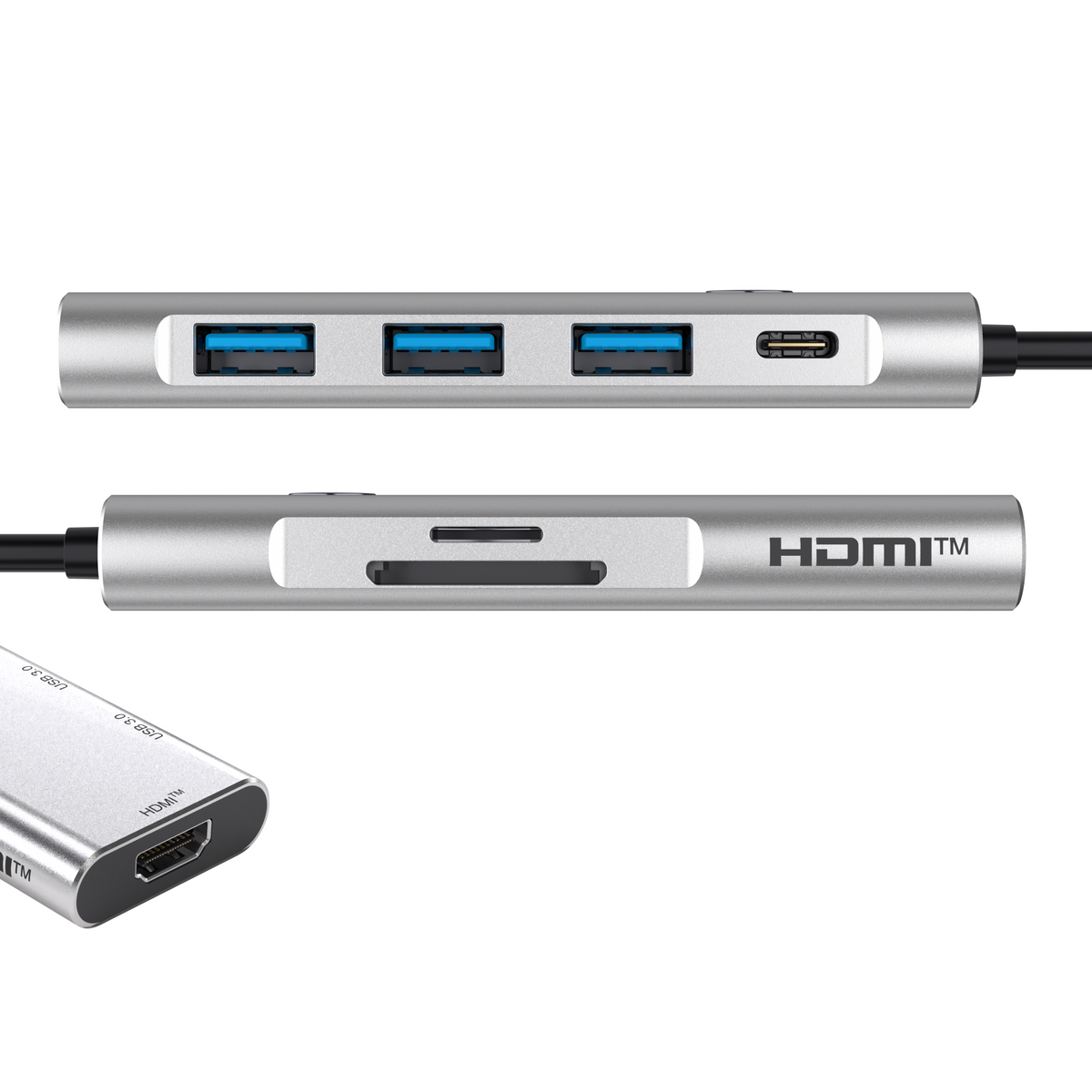
The BYL-2425 turns the iPad Pro's single Thunderbolt port into seven: a 4K@60Hz HDMI output for an external monitor, three USB-A 3.0 ports at 5 Gbps for drives and peripherals, dual SD and microSD readers for camera media, and a USB-C Power Delivery input rated up to 100W (20V/5A). The display, storage, and charger all run at once, so nothing has to be unplugged mid-session.
Desk Performance in a Travel-Sized Body
At 100 grams in a slim aluminum shell, it slips into any bag, and the 143 mm integrated cable keeps it compatible with cases and Magic Keyboard setups that block direct-attach hubs. HDMI also supports 1080p at 120Hz for high-refresh displays. At $49.99 (regular $59.99) with a 1-year warranty and 30-day returns, it undercuts rivals that charge $70 and up for the same 4K@60Hz and 100W combination.
What Makes a USB-C Hub Compatible with iPad Pro?

A USB-C hub for iPad Pro splits the tablet's single Thunderbolt/USB4 port into multiple connections: HDMI for an external display, USB-A for drives and peripherals, card readers for camera media, and a Power Delivery input that keeps the iPad charged while everything else stays plugged in.
The core problem sits in the hardware. Every M-series iPad Pro carries exactly one port, and iPadOS keeps expanding what that port can do. Stage Manager runs a full extended desktop on an external monitor at up to 6K, Final Cut Pro and Lightroom read footage straight from SSDs and SD cards, and USB microphones or MIDI keyboards connect natively. Using any of these features means the charging cable comes out, and the battery starts draining mid-session. A hub with PD passthrough removes that trade-off: power flows in through the hub while the display, storage, and accessories run simultaneously.
Compatibility splits into four hub types, each with a distinct fit:
Direct-attach hubs plug straight into the iPad's port and hug the tablet's edge. They add zero cable clutter and travel well, though thick cases can block the connector, and a Magic Keyboard sometimes forces a specific plug-in orientation.
Cabled hubs connect through a short integrated USB-C cable. They work with any case, sit flat on the desk, and typically pack more ports than direct-attach models. This category holds the best price-to-port ratio in the roundup.
Stand/dock hybrids combine a hub with an iPad stand, raising the screen to a comfortable angle for video calls and desk work. They weigh more and stay on the desk rather than in a bag.
Thunderbolt docks exploit the iPad Pro's full 40 Gbps bandwidth, which standard 5–10 Gbps USB-C hubs never touch. They cost several times more and make sense for users who also connect a MacBook, run 6K displays, or move large video files daily.
Two categories to avoid: DisplayLink-based docks, which rely on host drivers iPadOS does not provide for full functionality, and bus-powered hubs without any PD input, which drain the iPad's battery while occupying its only port.
Comparison Table - Top 10 USB-C Hubs for iPad Pro

|
Model |
Hub Type |
Ports |
Max Video Output |
PD Passthrough |
Weight |
Price |
|
Turonic ConnectHub Pro BYL-2425 |
C |
7-in-1 |
4K@60Hz / 1080p@120Hz |
100W |
100 g |
$49.99 |
|
Satechi Aluminum Stand & Hub |
S/D |
6-in-1 |
4K@60Hz |
60W |
283 g |
$99.99 |
|
HyperDrive 6-in-1 USB-C Hub for iPad |
DA |
6-in-1 |
4K@60Hz |
60W |
33 g |
$99.99 |
|
Anker 555 USB-C Hub (8-in-1) |
C |
8-in-1 |
4K@60Hz |
85W (100W input) |
125 g |
$49.99 |
|
UGREEN Revodok Pro 109 |
C |
9-in-1 |
4K@60Hz |
100W |
–* |
$39.99 |
|
CalDigit TS4 Thunderbolt 4 Dock |
TB |
18 ports |
dual 6K@60Hz / single 8K |
98W |
640 g |
$359.95 |
|
Belkin Connect Universal USB-C Hub |
C |
6-in-1 |
4K HDMI |
100W (–12W operation) |
89 g |
$69.99 |
|
Twelve South StayGo mini |
DA/C |
4-in-1 |
4K@30Hz |
85W |
36 g |
$59.99 |
|
Anker 541 USB-C Hub (6-in-1) for iPad |
DA |
6-in-1 |
4K@60Hz |
54W (60W input) |
–* |
$55.99 |
|
Satechi Slim Multiport Adapter |
C |
4/6/7-in-1 |
4K@60Hz |
100W (80W output) |
65 g |
from $59.99 |
Legend: DA = direct-attach (plugs into the iPad's port), C = cabled (integrated USB-C cable), S/D = stand/dock hybrid, TB = Thunderbolt 4 dock. *Weight pending verification at the review stage.
Top 10 USB-C Hubs for iPad Pro Reviewed
Each hub below underwent the same evaluation: verified port specs, video output limits, actual passthrough wattage after accounting for operational overhead, and fit with iPad Pro workflows, from Stage Manager desks to carry-on bags.
Turonic ConnectHub Pro BYL-2425 — Best Overall USB-C Hub for iPad Pro

Rating: ⭐⭐⭐⭐⭐
The BYL-2425 expands the iPad Pro's single port into seven connections through a slim aluminum body weighing 100 grams. Its HDMI output supports 4K at full 60Hz, while most hubs in this price bracket cap at 30Hz. Three USB-A 3.0 ports handle drives, dongles, and input devices simultaneously, and the 143 mm integrated cable keeps the hub compatible with any iPad case.
Detailed Specifications:
- Hub Type: Cabled (143 mm integrated cable)
- Ports: 7-in-1 (HDMI, 3× USB-A 3.0, SD, microSD, USB-C PD)
- Video Output: 4K@60Hz / 1080p@120Hz
- Data Transfer Speed: 5 Gbps per USB-A port
- PD Passthrough: Up to 100W (20V/5A)
- Card Reader: SD + microSD (USB 3.0 speed)
- Cable Length: 143 mm / 5.63 in
- Weight: 100 g / 0.22 lbs
- Compatibility: iPad Pro, Mac, Windows, Android, iPhone
- Price: $49.99 (regular $59.99)
+ Pros:
- 4K@60Hz at a sub-$50 price
- Full 100W PD passthrough
- Three USB-A ports simultaneously
- Dual SD/microSD card readers
- 100 g aluminum travel build
- 1-year warranty, 30-day returns
- Cons:
- No Ethernet port
- No 3.5mm audio jack
- Single USB-C (charging only)
Why it's our choice for iPad Pro:
The BYL-2425 covers the three things iPad Pro owners actually plug in: a 4K@60Hz monitor for Stage Manager, camera cards for Lightroom, and external drives, while 100W passthrough keeps the tablet charged. Rivals with this spec sheet cost $70 and up.
Satechi Aluminum Stand & Hub for iPad Pro

Rating: ⭐⭐⭐⭐☆
This accessory merges a folding aluminum stand with a 6-port hub, holding the iPad Pro at a 115-degree angle for desk work. The integrated USB-C cable tucks into the base when folded, and all ports stay usable in the closed position. The gap accepts cased iPads up to 15 mm thick. At 283 grams, it stays portable enough for a backpack.
Detailed Specifications:
- Hub Type: Stand/dock hybrid
- Ports: 6-in-1 (HDMI, USB-A, SD, microSD, 3.5mm audio, USB-C PD)
- Video Output: 4K@60Hz
- Data Transfer Speed: 5 Gbps (USB-A)
- PD Passthrough: Up to 60W (charge only)
- Card Reader: SD + microSD (UHS-I, 104 MB/s)
- Cable Length: ~8 in / 20 cm integrated
- Weight: 283 g / 10 oz
- Compatibility: iPad Pro, iPad Air, other USB-C tablets
- Price: $99.99
+ Pros:
- Stand and hub in one
- 4K@60Hz HDMI output
- Audio jack with mic support
- Ports usable when folded
- Fits cases up to 15 mm
- Cons:
- USB-C port charges only, no data
- Stand angle fixed at 115 degrees
- Incompatible with Magic Keyboard docked
- Slow UHS-I card readers
Why it's our choice for iPad Pro:
For a stationary iPad Pro workstation, it solves two problems at once: screen elevation for video calls and port expansion for display, storage, and audio, all through one cable that disappears into the base.
HyperDrive 6-in-1 USB-C Hub for iPad

Rating: ⭐⭐⭐⭐☆
HyperDrive built this hub specifically around the iPad's edge: a removable grip clamps it flush against the tablet without scratching the surface. Six ports include 4K@60Hz HDMI, 60W PD, USB-A, both card slots, and an audio jack. An included USB-C extender cable converts it into a standard cabled hub for cased iPads or MacBooks. It weighs 33 grams, the lightest full-featured pick here.
Detailed Specifications:
- Hub Type: Direct-attach (grip mount, extender cable included)
- Ports: 6-in-1 (HDMI, USB-A, SD, microSD, 3.5mm audio, USB-C PD)
- Video Output: 4K@60Hz
- Data Transfer Speed: 5 Gbps
- PD Passthrough: Up to 60W
- Card Reader: SD + microSD (UHS-I)
- Cable Length: N/A direct-attach; extender included
- Weight: 33 g / 1.16 oz
- Compatibility: All USB-C iPads, MacBook via extender
- Price: $99.99 (street from $89.99)
+ Pros:
- Flush iPad-hugging design
- 33 g pocketable weight
- 4K@60Hz HDMI
- Extender cable included
- Audio jack onboard
- Grip removable for cases
- Cons:
- UHS-I card speed only
- 60W PD ceiling
- Single USB-A port
- Premium price per port
Why it's our choice for iPad Pro:
The form-fitting grip turns hub and tablet into one object, so nothing dangles while sketching or shooting handheld. Field creators who move constantly between locations get full monitor and card support with zero desk footprint.
Anker 555 USB-C Hub (8-in-1)

Rating: ⭐⭐⭐⭐☆
The Anker 555 packs eight ports into a 125-gram slab: 10 Gbps USB-C and dual 10 Gbps USB-A data ports, 4K@60Hz HDMI, Gigabit Ethernet, and both card slots. The 100W PD input delivers 85W to the device after the hub takes 15W for operation. A 7.48-inch built-in cable and included travel pouch make it a strong desk-and-bag hybrid.
Detailed Specifications:
- Hub Type: Cabled (built-in 7.48 in cable)
- Ports: 8-in-1 (HDMI, USB-C data, 2× USB-A, Ethernet, SD, microSD, USB-C PD-IN)
- Video Output: 4K@60Hz (DP 1.4 hosts)
- Data Transfer Speed: 10 Gbps (USB-C and USB-A)
- PD Passthrough: 85W to device (100W input)
- Card Reader: SD + microSD (UHS-I)
- Cable Length: 7.48 in / 19 cm
- Weight: 125 g / 4.4 oz
- Compatibility: iPadOS, macOS 12+, Windows 10/11, ChromeOS; no Linux
- Price: $49.99
+ Pros:
- 10 Gbps on all data ports
- Gigabit Ethernet included
- 4K@60Hz HDMI
- 85W real-world charging
- Travel pouch included
- Strong price per port
- Cons:
- Runs warm under full load
- No audio jack
- UHS-I card readers
- Needs 100W charger for max PD
Why it's our choice for iPad Pro:
Its 10 Gbps data ports match the iPad Air and saturate most external SSDs, so ProRes offloads finish fast. Ethernet adds wired stability for large uploads, which video editors on hotel Wi-Fi will appreciate.
UGREEN Revodok Pro 109 9-in-1 USB-C Hub

Rating: ⭐⭐⭐⭐☆
The Revodok Pro 109 delivers the widest port spread under $40: nine connections including 4K@60Hz HDMI, Gigabit Ethernet, a 10 Gbps USB-C port, one 10 Gbps USB-A plus two 5 Gbps USB-A ports, and SD/TF card slots. The ribbed aluminum body works as a heatsink, and the braided cable survives bag life. Its card readers run at 170 MB/s, faster than most rivals' 104 MB/s ceiling.
Detailed Specifications:
- Hub Type: Cabled (braided integrated cable)
- Ports: 9-in-1 (HDMI, USB-C data, 3× USB-A, Ethernet, SD, microSD, USB-C PD)
- Video Output: 4K@60Hz
- Data Transfer Speed: 10 Gbps (USB-C + 1 USB-A); 5 Gbps (2× USB-A)
- PD Passthrough: Up to 100W
- Card Reader: SD + microSD (170 MB/s)
- Cable Length: Integrated, braided
- Weight: ~198 g / 7 oz (manufacturer listing)
- Compatibility: iPadOS, macOS, Windows, Linux
- Price: $39.99 (street from $29.98)
+ Pros:
- Nine ports under $40
- 170 MB/s card readers
- 100W PD passthrough
- Aluminum heatsink body
- 4K@60Hz HDMI
- Braided cable durability
- Cons:
- Ethernet may need driver setup
- No audio jack
- Heavier than direct-attach rivals
- Mixed USB-A speeds confuse
Why it's our choice for iPad Pro:
Photographers offloading full SD cards to iPad Pro get roughly 60% faster ingest than UHS-I hubs allow, and the price leaves budget for a fast card. It reads as the value anchor of this entire roundup.
CalDigit TS4 Thunderbolt 4 Dock

Rating: ⭐⭐⭐⭐☆
The TS4 sits in a different weight class: 18 ports through a single Thunderbolt 4 cable, using the iPad Pro's full 40 Gbps bandwidth that USB-C hubs never touch. It drives dual 6K@60Hz or a single 8K display, charges at 98W, and adds 2.5 Gigabit Ethernet plus UHS-II card readers at 312 MB/s. The 640-gram aluminum tower stands vertically or lies flat.
Detailed Specifications:
- Hub Type: Thunderbolt 4 desktop dock
- Ports: 18 (3× TB4, 3× USB-C 10G, 5× USB-A 10G, DP 1.4, SD, microSD, 2.5GbE, audio in/out)
- Video Output: Dual 6K@60Hz / single 8K
- Data Transfer Speed: 40 Gbps (TB4); 10 Gbps (USB)
- PD Passthrough: 98W
- Card Reader: SD + microSD (UHS-II, 312 MB/s)
- Cable Length: 0.8 m certified TB4 cable
- Weight: 640 g / 1.41 lbs
- Compatibility: Thunderbolt 4/3, USB4, USB-C hosts; Mac, Windows, iPad Pro
- Price: $359.95 (street ~$379.99)
+ Pros:
- Full 40 Gbps Thunderbolt bandwidth
- 18 ports, single cable
- UHS-II card readers
- 98W charging, class-leading
- 2.5GbE networking
- Doubles as MacBook dock
- Cons:
- Price of seven budget hubs
- Desk-bound size and weight
- External power brick required
- Overkill for casual iPad use
Why it's our choice for iPad Pro:
M-series iPad Pros carry Thunderbolt bandwidth that 5 Gbps hubs waste. The TS4 unlocks it: NVMe SSDs at full speed, a 6K display, and instant charging, turning the tablet into a genuine desktop the moment one cable clicks in.
Belkin Connect Universal USB-C Hub

Rating: ⭐⭐⭐⭐☆
Belkin's Connect 6-in-1 adapter covers office fundamentals: 4K HDMI, two USB-A 3.0 ports, Gigabit Ethernet, an SD reader, and 100W PD passthrough (12W reserved for operation). The 89-gram housing and short 5-inch cable lie flat beside the tablet. Data tops out at 5 Gbps, adequate for flash drives and card offloads. The current revision reaches 4K@60Hz; the earlier one capped at 30Hz.
Detailed Specifications:
- Hub Type: Cabled (5 in tethered cable)
- Ports: 6-in-1 (HDMI, 2× USB-A, Ethernet, SD, USB-C PD)
- Video Output: 4K@60Hz current revision (4K@30Hz on earlier units)
- Data Transfer Speed: 5 Gbps
- PD Passthrough: Up to 100W (minus 12W operation)
- Card Reader: SD only
- Cable Length: 5 in / 12.7 cm
- Weight: 89 g / 0.2 lbs
- Compatibility: iPad Pro, MacBook, Chromebook, Windows
- Price: $69.99
+ Pros:
- Gigabit Ethernet onboard
- 100W PD input
- 2-year warranty
- Compact flat-lay design
- Free dock utility software
- Cons:
- No microSD slot
- 5 Gbps ceiling
- Older stock runs 4K@30Hz
- Price above faster rivals
Why it's our choice for iPad Pro:
Corporate environments favor Belkin for warranty handling and fleet consistency, and the Ethernet port keeps iPad-based POS or conference setups on wired networks. Buyers should confirm the current revision to secure 60Hz output.
Twelve South StayGo mini

Rating: ⭐⭐⭐⭐☆
The StayGo mini strips the concept to four ports in a 36-gram stick: HDMI, USB-A, audio out, and an 85W PD input. It plugs directly into the iPad or connects via the included 20-inch detachable cable, which also lets it connect to a MacBook. HDMI caps at 4K@30Hz and the USB-A port runs USB 2.0 speeds, so this one targets presentations over production.
Detailed Specifications:
- Hub Type: Direct-attach with detachable cable option
- Ports: 4-in-1 (HDMI, USB-A, audio out, USB-C PD)
- Video Output: 4K@30Hz
- Data Transfer Speed: 480 Mbps (USB 2.0)
- PD Passthrough: Up to 85W
- Card Reader: N/A
- Cable Length: 20 in / 50 cm detachable (optional use)
- Weight: 36 g / 1.3 oz
- Compatibility: iPad Pro, MacBook, USB-C tablets
- Price: $59.99
+ Pros:
- 36 g pocket footprint
- 85W passthrough charging
- Dual connection modes
- Audio out included
- Clean minimalist design
- Cons:
- 4K limited to 30Hz
- USB 2.0 data speeds
- No card readers
- Discontinued, stock shrinking
Why it's our choice for iPad Pro:
Presenters who need HDMI-out plus charging on conference-room projectors get exactly that with nothing extra to carry. The 30Hz cap matters little for slides, and the detachable cable handles cased iPads gracefully.
Anker 541 USB-C Hub (6-in-1) for iPad

Rating: ⭐⭐⭐⭐☆
Anker shaped the 541 to match the iPad's chassis, plugging flush into the port with reversible orientation for screen-protector setups. Six connections include 4K@60Hz HDMI, a multi-function USB-C port that either charges at up to 54W or moves data at 5 Gbps, one USB-A port, both card slots, and a 3.5mm jack. Stage Manager support is explicit in Anker's documentation.
Detailed Specifications:
- Hub Type: Direct-attach
- Ports: 6-in-1 (HDMI, USB-C multi-function, USB-A, SD, microSD, 3.5mm audio)
- Video Output: 4K@60Hz
- Data Transfer Speed: 5 Gbps (USB-C and USB-A)
- PD Passthrough: 54W to iPad (60W charger required)
- Card Reader: SD + microSD (104 MB/s)
- Cable Length: N/A (direct-attach)
- Weight: N/A (not published by Anker)
- Compatibility: All USB-C iPads, iPadOS 14+
- Price: $55.99 (street)
+ Pros:
- Made-for-iPad flush fit
- 4K@60Hz HDMI
- Audio jack onboard
- Reversible plug orientation
- Dual card slots
- 18-month warranty
- Cons:
- USB-C port charges or transfers, never both
- 54W charging ceiling
- Blocks port with thick cases
- iPad-only design limits reuse
Why it's our choice for iPad Pro:
It behaves like a factory extension of the tablet: matched styling, documented Stage Manager support, and an audio jack for wired monitoring while recording. Artists using the iPad handheld keep every port without a dangling cable.
Satechi Slim Multiport Adapter (7-in-1)

Rating: ⭐⭐⭐⭐☆
Satechi's Slim Multiport line comes in 4, 6, and 7-port configurations; the 7-in-1 reviewed here adds Gigabit Ethernet and dual card readers to 4K@60Hz HDMI, two 10 Gbps USB-A ports, and a 100W PD input with 80W output. The 65-gram aluminum body and braided cable with reinforced neck address the usual failure point of tethered hubs.
Detailed Specifications:
- Hub Type: Cabled (braided 16.8 cm cable)
- Ports: 7-in-1 (HDMI, 2× USB-A, Ethernet, SD, microSD, USB-C PD)
- Video Output: 4K@60Hz
- Data Transfer Speed: 10 Gbps (USB-A 3.2 Gen 2)
- PD Passthrough: 100W input / 80W output
- Card Reader: SD + microSD (UHS-I, 104 MB/s)
- Cable Length: 6.6 in / 16.8 cm
- Weight: 64.5 g / 2.27 oz
- Compatibility: iPad Pro, MacBook, Windows, ChromeOS
- Price: from $59.99 (by configuration)
+ Pros:
- 10 Gbps USB-A ports
- Three configurations to choose
- Braided reinforced cable
- 65 g slim profile
- Gigabit Ethernet (7-in-1)
- 4K@60Hz HDMI
- Cons:
- UHS-I card speed
- 15W operational power loss
- USB-A ports data-only
- No audio jack
Why it's our choice for iPad Pro:
The configuration ladder lets buyers pay only for needed ports while keeping identical build quality, and 10 Gbps USB-A moves camera archives to external drives at twice the pace of typical 5 Gbps hubs.
How to Choose a USB-C Hub for iPad Pro

Start with hub type, because it eliminates more options than any spec on the sheet. Direct-attach models such as the HyperDrive 6-in-1 or Anker 541 sit flush against the tablet and suit handheld work, though thick cases and some keyboard folios block them. Cabled hubs like the Turonic BYL-2425 tolerate any case and pack more ports per dollar. Stands earn their place on permanent desks, and Thunderbolt docks belong to users who also run a MacBook or a 6K display.
Match the Bandwidth to Your iPad
Every M-series iPad Pro carries a Thunderbolt/USB4 port rated at 40 Gbps, while standard hubs pass 5 or 10 Gbps. Casual users lose nothing at 5 Gbps; anyone editing ProRes from an external NVMe drive will immediately notice the difference. Stage Manager drives an extended desktop through any hub with HDMI or a video-capable USB-C port, so the bandwidth question mostly concerns storage speed rather than display support.
Check Real Passthrough Wattage
A 13-inch iPad Pro fast-charges at around 30W and up, and hubs consume 12 to 15W of the input for their own operation. A hub rated "100W" with a 30W charger attached passes far less to the tablet, so pair the hub with a charger rated above your target. Models with 100W input, including the Turonic BYL-2425, UGREEN Revodok Pro 109, and Belkin Connect, leave the most headroom for future laptops.
Prioritize 60Hz Video Output
The gap between 4K@30Hz and 4K@60Hz decides whether an external monitor feels fluid or sluggish. Cursor motion, scrolling, and timeline scrubbing all stutter at 30Hz, which is why the StayGo mini suits static presentations while 60Hz models fit daily desk work. Confirm the refresh rate in the spec sheet rather than the marketing headline, since "4K HDMI" alone often hides a 30Hz cap.
Weigh Card Reader Speed Against Workflow
UHS-I readers move files at up to 104 MB/s, and a full 128 GB card takes over 20 minutes at that pace. The UGREEN Revodok Pro 109 reaches 170 MB/s and the CalDigit TS4 hits 312 MB/s over UHS-II, cutting the same offload to a fraction. Anyone shooting stills or video on cards should treat reader speed as a first-order criterion rather than a footnote.
Budget shapes the final call. Under $50 buys the strongest value tier, where the Turonic BYL-2425 and Anker 555 cover 4K@60Hz and high-wattage charging. The $60 to $100 range adds stands, flush-fit designs, and brand warranties. Above $350 sits Thunderbolt territory, justified only when the full 40 Gbps pipeline earns its keep daily.
FAQ
Does a USB-C hub work with the iPad Pro's Thunderbolt port?
Yes, every USB-C hub connects to the iPad Pro because Thunderbolt/USB4 remains backward-compatible with USB-C. The hub simply runs at its own maximum speed, so a 5 Gbps hub caps transfers at 5 Gbps even though the port itself supports 40 Gbps.
What is the best USB-C hub for iPad Pro with an external monitor?
The Turonic ConnectHub Pro BYL-2425 pairs 4K@60Hz HDMI output with 100W passthrough charging for $49.99, which fully covers a Stage Manager desk setup. Users driving 6K displays or dual monitors need a Thunderbolt dock such as the CalDigit TS4.
Can a USB-C hub charge the iPad Pro while other ports are in use?
Any hub with a Power Delivery input charges the tablet while the display, drives, and card readers stay active. Subtract 12 to 15W of operational overhead from the input wattage, so a 100W charger delivers roughly 85W to the device.
Why does my hub's external display flicker or drop to 30Hz?
Bandwidth sharing causes this: on 5 Gbps hubs, the HDMI signal competes with active USB traffic, and heavy drive transfers can force the output down. A 10 Gbps hub or a Thunderbolt dock keeps 4K@60Hz stable under simultaneous load.
Do USB-C hubs support importing SD cards into Lightroom and Final Cut on iPadOS?
Yes, iPadOS mounts hub card readers natively in the Files app, and both Lightroom and Final Cut Pro import directly from them. Reader speed determines ingest time: 104 MB/s on UHS-I models, 170 MB/s on the UGREEN Revodok Pro 109, and 312 MB/s on the CalDigit TS4.
How long after getting an iPad Pro should I buy a USB-C hub?
Buy the hub along with the tablet if an external display, camera cards, or wired accessories are part of your workflow, since the single port becomes a bottleneck on day one. Owners who only charge and sync can defer the purchase until a concrete need shows up.
Conclusion
A USB-C hub decides how much of the iPad Pro's potential actually gets used, and the Turonic ConnectHub Pro BYL-2425 earns the top recommendation for three concrete reasons: 4K@60Hz HDMI output that most sub-$50 rivals skip, full 100W passthrough that keeps the tablet charged under any load, and seven ports including triple USB-A and dual card readers in a 100-gram aluminum body.
The secondary picks map to specific setups. Desk-bound users gain the most from the Satechi Aluminum Stand & Hub, mobile creators from the 33-gram HyperDrive 6-in-1, photographers from the UGREEN Revodok Pro 109 with its 170 MB/s card readers, and professionals running 6K displays or NVMe storage from the CalDigit TS4. Match the hub type to where you work, confirm 60Hz output and real passthrough wattage, and the single-port limitation of the iPad Pro stops being a limitation at all.


